> For the complete documentation index, see [llms.txt](https://docs.gridmate.io/llms.txt). Markdown versions of documentation pages are available by appending `.md` to page URLs; this page is available as [Markdown](https://docs.gridmate.io/advanced-guides/save-hook-framework.md).
# Save Hook Framework
{% hint style="warning" %}
This is **not a Salesforce trigger** it works **only within the GridMate component**.
{% endhint %}
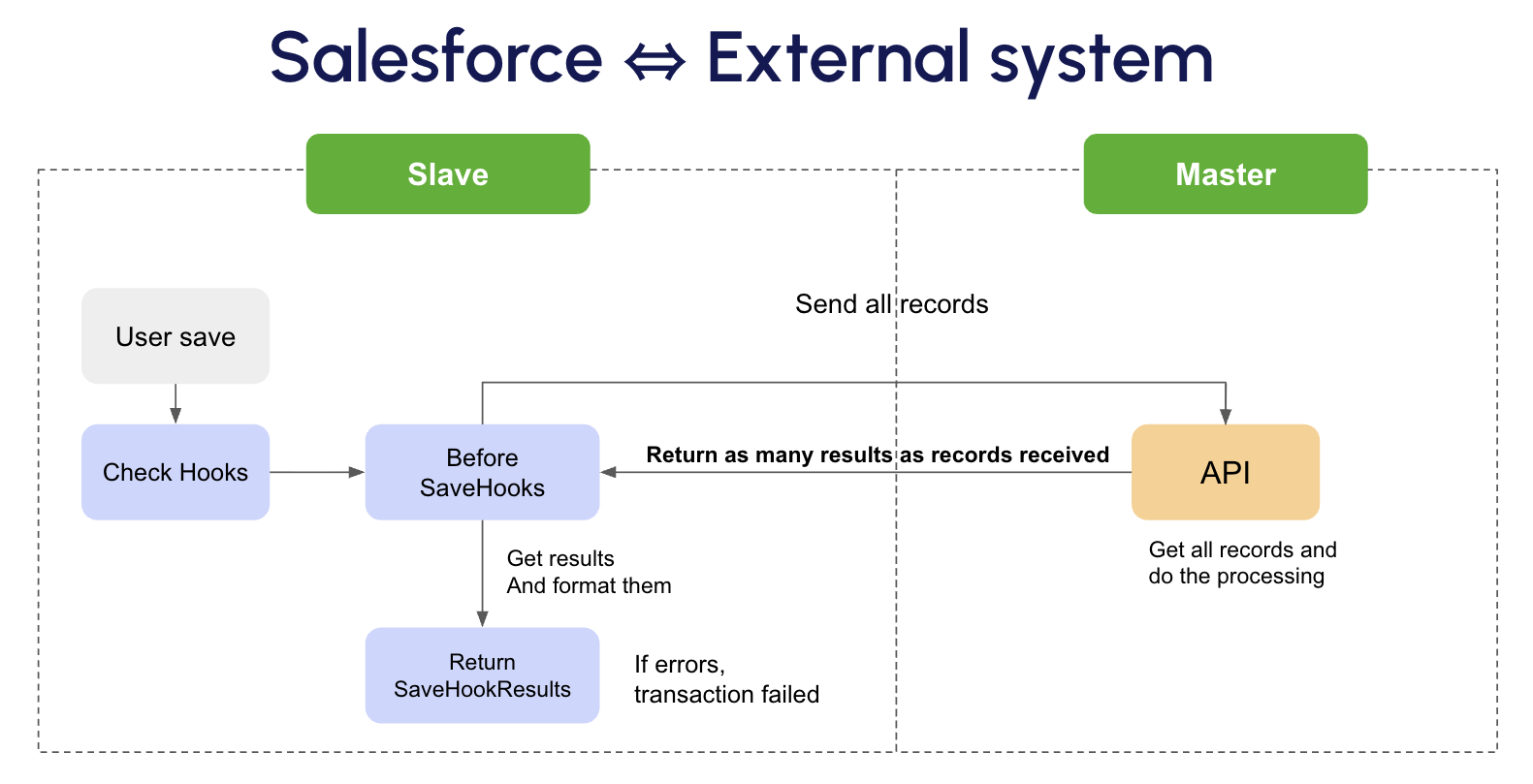
Gridmate **Save Hook** is a customizable Apex extension point that allows you to inject logic before or after Salesforce record save operations (Insert or Update) while maintaining **synchronous** and **asynchronous** processing flows with **external systems**.
## Rules for Save Hook and Callouts
### **1. Key Principles**
* For every **N records** processed, you must return exactly **N `SaveHookResult` objects** one per record.
* The **order of results** must exactly match the **order of input records**.
* The framework uses **positional mapping** *(Record n → Result n)* to correctly associate results, ensuring accurate error reporting and user feedback.
{% hint style="info" %}
Maintaining this one-to-one correspondence is essential for reliable Save Hook processing.
{% endhint %}
### **2. Callout Execution Rules**
**Synchronous callouts** are allowed **only** in the following contexts:
* `beforeInsert`
* `beforeUpdate`
At these points, the transaction has not yet been committed, making synchronous communication with external systems safe.
**Synchronous callouts are prohibited** in:
* `afterInsert`
* `afterUpdate`
Use asynchronous methods instead:
* `@future(callout=true)` for simple, deferred operations.
* **Queueable Apex jobs** (with callouts enabled) for more complex or queued background processing.
{% hint style="info" %}
This ensures compliance with Salesforce callout rules and maintains transaction safety.
{% endhint %}
### **3. Before Events - Validation Stage**
Use the **`beforeInsert`** and **`beforeUpdate`** events for **record validation** prior to saving data to Salesforce.
When a validation fails, return a **`SaveHookResult`** configured as follows:
* `isSuccess = true` marks the record as valid.
* `isSuccess = false` marks the record as invalid.
* `statusCode` *(optional)* provides an error code or identifier.
* `message` gives a clear explanation of the validation issue.
For standard patterns and reusable logic, refer to the **`SaveHookManager`** managed class.
### **4. After Events - Post-Processing Stage**
Use **`afterInsert`** and **`afterUpdate`** for **post-commit operations** such as:
* Synchronizing with external systems.
* Performing data enrichment.
* Triggering asynchronous workflows or notifications.
All logic in this stage should be **non-blocking** and **asynchronous**, ensuring smooth execution without affecting the main transaction.
{% hint style="warning" %}
Never perform direct (synchronous) callouts in `afterInsert` or `afterUpdate`, as this will trigger **Salesforce transaction errors** and compromise data integrity.
{% endhint %}
## Save Hook Setup
### 1. Framework instantiation
Here’s an example of the **Save Hook apex Code**:
To create a custom Save Hook, you must implement the **`gmpkg.SaveHookManager.ISaveHook`** global interface provided by the GridMate framework.
{% hint style="info" %}
The list of objects passed to the Save Hook method acts as a **direct reference** any updates made to the records in this list will automatically **modify the values that the component commits** to Salesforce.
{% endhint %}
global class QuoteSaveHook implements gmpkg.SaveHookManager.ISaveHook {
    global static List<gmpkg.SaveHookManager.SaveHookResult> call(String action, List<Quote> quotes) {
           List<gmpkg.SaveHookManager.SaveHookResult> res = new List<gmpkg.SaveHookManager.SaveHookResult>();

           switch on action {
               when 'beforeUpdate' { // Synchronous call
                    ... create HTTP request ...
                    HttpResponse response = new Http().send(req);
                    List<Object> apiResults = (List<Object>) JSON.deserializeUntyped(response.getBody());

                    for (Integer i = 0; i < quotes.size(); i++) {
                        Quote newQuote = quotes[i];

                        /*
                        this is the API result
                        for example if I receive :
                        {
                            "statusCode" : "400",
                            "messageAPI" : "error",
                            "success" : false,
                            "relatedFields" : ["Test__c"]
                        }
                        i will map this fields with the SaveHookResult
                        */
                        Map<String, Object> apiResult = (Map<String, Object>) apiResults[i];
                        Booloean success = (Boolean) apiResult.get('success');
                        String statusCode = (String) apiResult.get('statusCode');
                        String message = (String)  apiResult.get('messageAPI');
                        List<String> fields = (List<String>) apiResult.get('relatedFields');

                        if (success == false) {
                            gmpkg.SaveHookManager.SaveHookResult errorResult = new gmpkg.SaveHookManager.SaveHookResult(success, statusCode, message, fields);
                            res.add(errorResult);
                        } else {
                            gmpkg.SaveHookManager.SaveHookResult successResult = new gmpkg.SaveHookManager.SaveHookResult();
                            res.add(successResult);
                    }
                }
            }
        }
        return res;
    }
}
### 2. Save Hook Activation
1. Go to Setup.
2. Navigate to Custom Metadata Types.
3. Find Hook Config
4. Click Manage Records.
5. Create a new record
6. Fill in the required fields:
1. Label: **A descriptive name (e.g., Quote SaveHook before Update).**
2. SObject: **The Salesforce object (e.g., Quote).**
3. Hook Config Name: **Unique developer name for the config (e.g., QuoteSaveHook).**
4. Apex Class: **The class implementing the hook business logic (e.g., QuoteSaveHook).**
5. Context: **The trigger context (e.g., beforeUpdate, beforeInsert, etc.).**
6. Execution Order: **A number that defines in which sequence hooks run (lower numbers run first).**
7. Is Active: **Set to true to activate the hook.**
7. Save the record.
{% hint style="info" %}
With this setup, Salesforce will:
* Run all hooks for the given SObject and context.
* Respect the Execution Order (1 runs before 2, etc.).
{% endhint %}