> For the complete documentation index, see [llms.txt](https://docs.gridmate.io/llms.txt). Markdown versions of documentation pages are available by appending `.md` to page URLs; this page is available as [Markdown](https://docs.gridmate.io/advanced-guides/pivot-grid-advanced-settings.md).
# Pivot Grid - Advanced Settings
## Custom Action
We’ve introduced **custom action support for Pivot Grids**, allowing administrators to configure both **global actions** and **mass actions** directly within pivot views.
This enables users to trigger Salesforce **Flows** or **custom actions** without leaving the grid.
#### Flow – Apply Discount %
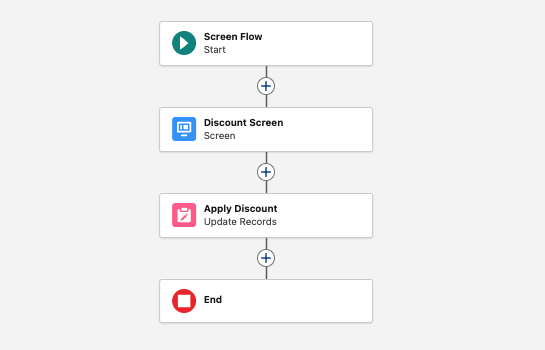
Below is an example of the **Apply Discount %** Screen Flow used in this demo.
The Flow includes:
* A **Discount Screen**, where the user enters the discount percentage
* An **Update Records** step, which applies the discount to the selected records
#### Action Configuration
Below is a sample configuration used in this demo:
```json
[
{
"label": "Apply Discount %",
"name": "Apply_Discount",
"component": "gmpkg:DataGridCallFlowComponent",
"attributes": {
"flowName": "Apply_Discount",
"idListParam": "idList",
"autolaunched": false
}
}
]
```
Below is a step-by-step tutorial on how to configure these actions 👇
{% embed url="" %}
## Second X Column
We’ve introduced support for **secondary X-axis columns** in Pivot Grids, enabling more advanced multi-dimensional analysis through hierarchical grouping.
In this advanced guide, we’ll cover:
* Configuring **two X-axis columns** to enable multi-level grouping
* Using **intermediate aggregations** to display summaries between grouped levels
* Hiding the **Grand Total** to control overall aggregation visibility
* Enabling **X-axis header groups** to improve structural clarity
Below is a step-by-step tutorial demonstrating how to configure these options 👇
{% embed url="" %}
## **Formulas**
Ever wished your grid could do the math for you? With PivotGrid Formulas, it can. Whether you're tracking margins, calculating totals, or applying logic on the fly you define the expression, GridMate delivers the result, right inside your grid. No code, no complex configurations, just pure flexibility at your fingertips.
Below is a step-by-step tutorial on how to configure PivotGrid Formulas 👇
{% embed url="" %}