> For the complete documentation index, see [llms.txt](https://docs.gridmate.io/llms.txt). Markdown versions of documentation pages are available by appending `.md` to page URLs; this page is available as [Markdown](https://docs.gridmate.io/product-tour/end-user-calendar.md).
# End User Calendar
As a Salesforce user, GridMate provides a configurable calendar that allows you to manage both standard and custom objects within a single calendar view. It supports advanced filtering, color conditioning, and more.
### Enable User Calendar Feature
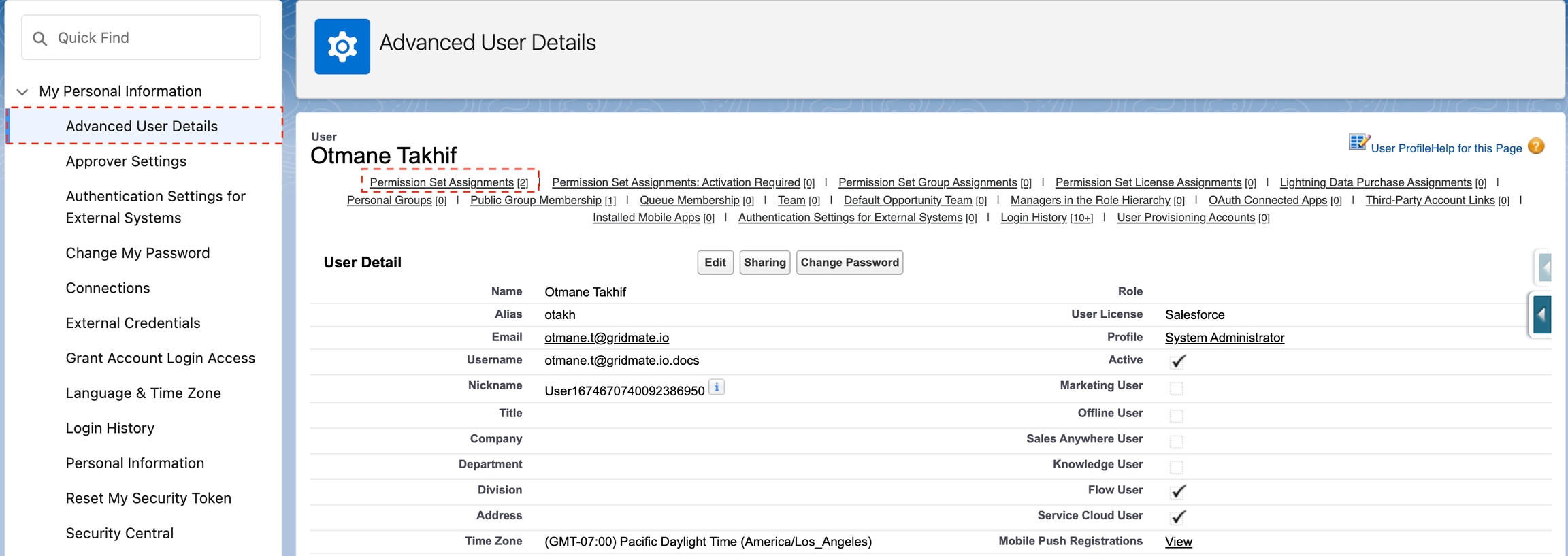
To enable **User Calendar** feature, simply navigate to your account settings and follow these steps:
* Go to advanced user details,
* Click on permission set assignments,
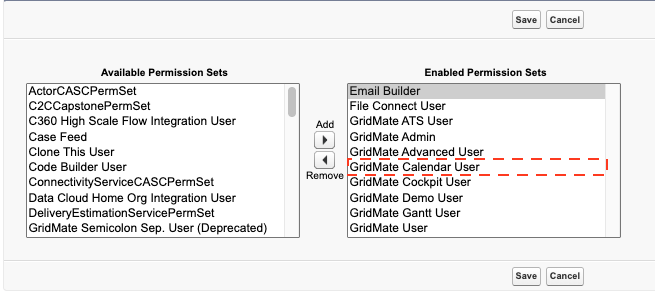
* Select **GridMate Calendar User** permission set
You are ready to start using the GridMate **User Calendar** and enjoy all its benefits.
### User Calendar Demo
Once you have enabled the **User Calendar** feature, you can start creating your **Calendar** Component. The following video provides a step-by-step tutorial��**.**
{% embed url="" %}
### Multi Object
GridMate’s **User Calendar Multi Object** feature allows users to display and manage multiple **standard** or **custom** objects within a **single calendar** view. Below is a step-by-step tutorial on how to configure and use the User Calendar Multi Object feature 👇.
{% embed url="" %}