> For the complete documentation index, see [llms.txt](https://docs.gridmate.io/llms.txt). Markdown versions of documentation pages are available by appending `.md` to page URLs; this page is available as [Markdown](https://docs.gridmate.io/advanced-guides/grid-apply-and-save.md).
# Grid - Apply & Save
## Apply & Save Setup
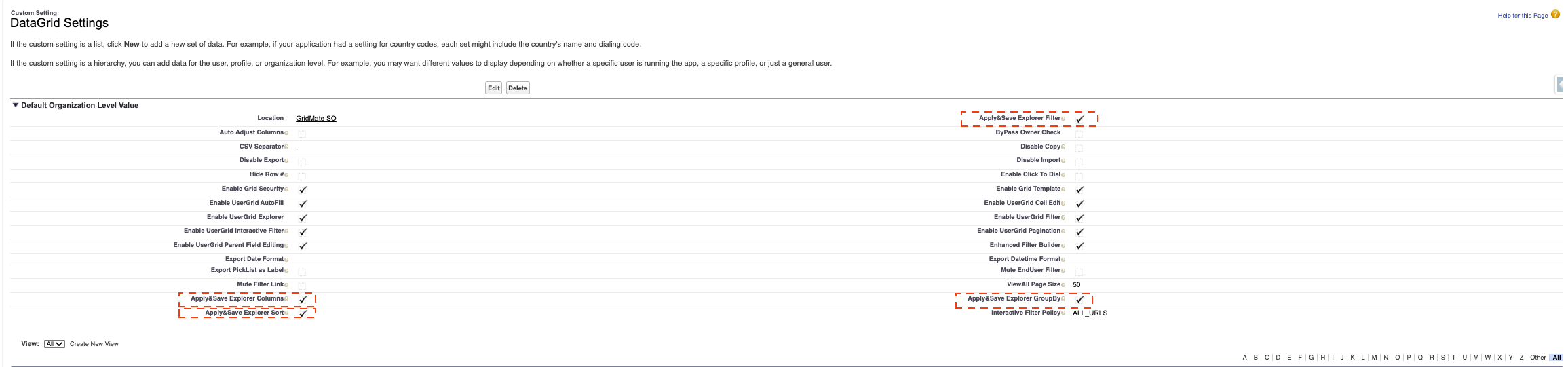
To allow users to permanently save their grid configurations, follow these steps:
1. Go to **Setup**, type **Custom Settings** in the Quick Find box.
2. Click **Manage** DataGrid Settings.
3. Configure Options: Check the following boxes:
* Apply & Save **Columns**
* Apply & Save **Sorting**
* Apply & Save **Filters**
* Apply & Save **GroupBy**
4. Click **Save** to apply the changes.
Once this configuration is activated, users will be able to use the **Apply & Save** feature
## Apply & Save Demo
Once **Apply & Save** is enabled, users can choose whether their grid changes are temporary or permanently saved.
The video below provides a step-by-step tutorial on how to use **Apply & Save** 👇
{% embed url="" %}